Illustrator has no table tool. Here’s how to build tables with MATE
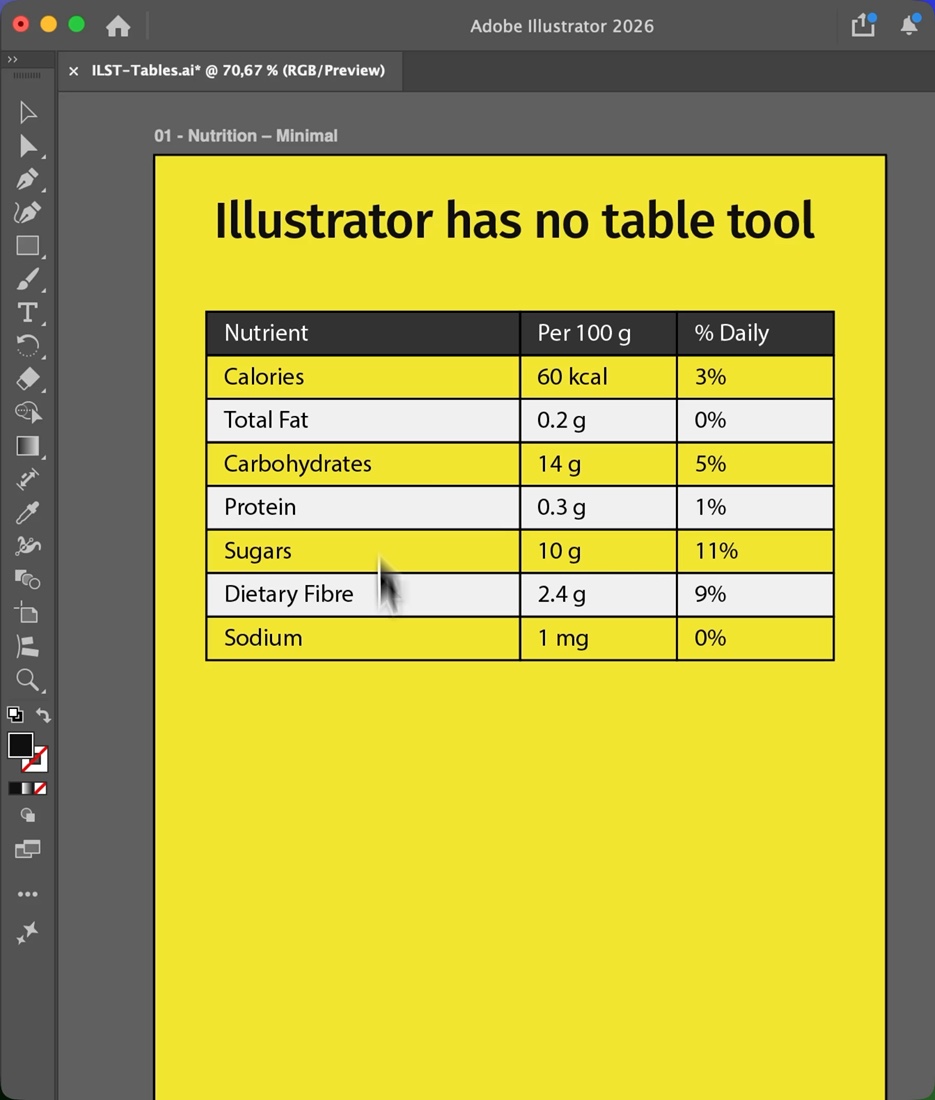
Illustrator still has no table tool. If you need a price list, a menu or a nutrition table, you build it by hand: a rectangle for every cell, a text frame for every value, everything lined up one by one. Add a row later and you redo half of it.
That’s tedious. So I asked MATE to do it.
Watch part 1 on YouTube: Make a table in Illustrator
Ask for the table
I opened MATE in Illustrator and typed:
Create a table with 3 columns and 5 rows. Add sample nutrition data. Make the first column 50% wide. No fills.
Couldn’t copy. Select the prompt and copy it manually.
MATE drew the table as regular Illustrator artwork: rectangles for the cells and a text frame for each value, all in one group. The first column takes half the width, the other two share the rest.
Edit it like any other artwork
Every value is a real text frame. To change a number, use the Type tool. To move the table, move the group.
For changes across many cells, just ask. I asked for a dark header and alternating rows, and MATE restyled the whole table in one step.
Fill it from a CSV
Drop a CSV into the MATE chat and ask it to update the table.
Update table with these CSV data
Couldn’t copy. Select the prompt and copy it manually.
My CSV had seven rows. MATE replaced the headings and values, added the missing rows, and kept the column widths and alternating fills. Before you use it in a layout, check the values and look for crowded cells.
Tip
Don’t have a CSV file right now? I asked MATE to create a sample CSV and save it to my Downloads folder.
Part 2: Build your own table tool
Asking MATE is useful for a one-off table. But if you make tables often, a reusable tool is faster. So I asked MATE to turn the table into a script with a dialog. A few prompts later, I had one:
- Width, row height, font and size
- A visual grid with an input for every cell, plus buttons to add or remove rows and columns
- Load a CSV file, or paste CSV in its own tab
- Bold header option
- Preview, to see the table on the artboard before you create it
Part 2 shows how to take this further: ask MATE to adjust the dialog the way you want it, add a preview mode, and load CSV data.
Watch part 2 on YouTube: Build your own reusable table script
Click Create Table and you get a grouped table with editable text. Save the script in MATE’s library so you can run it again anytime, or export it to share with others.
Try it
Download our Table Builder script and run it in Illustrator: File → Scripts → Other Script…, then choose table-builder.jsx. This download uses pasted CSV; the version in part 2 also opens CSV files. Or ask MATE to build your own version that fits how you work.